
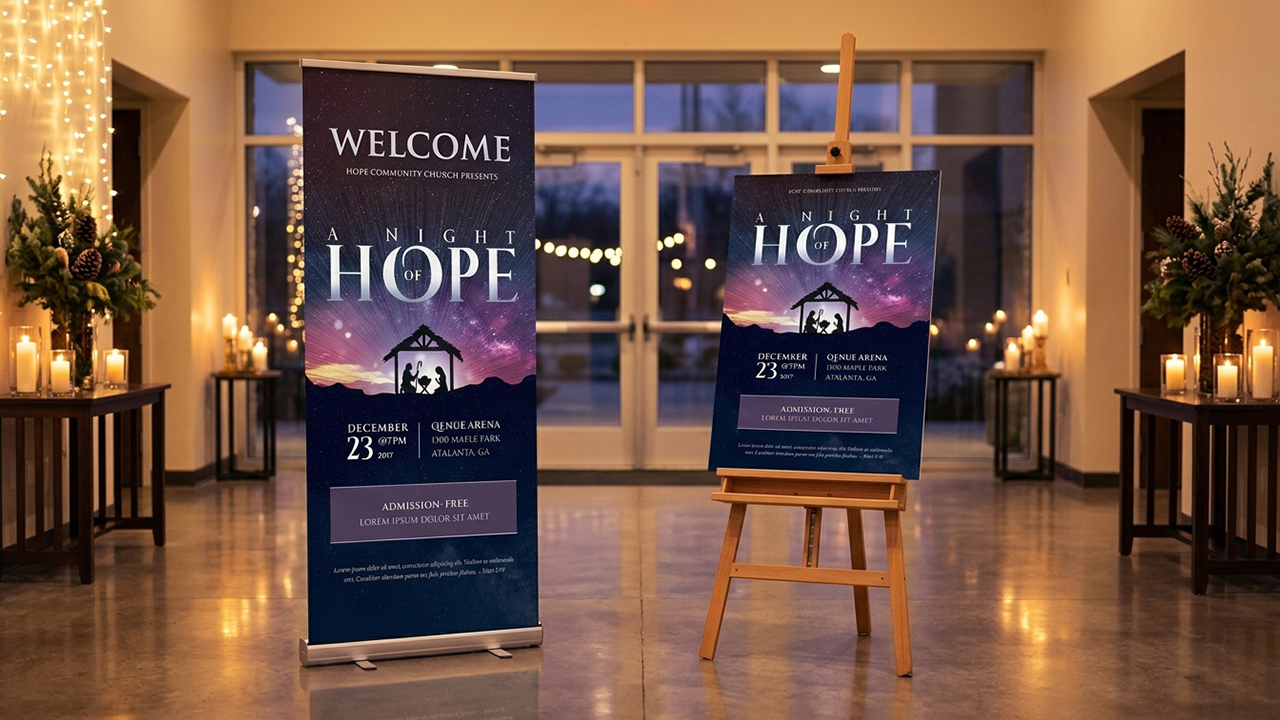
Stepping into a bustling church during the holidays can feel overwhelming for first-time visitors if event signage is confusing or visually inconsistent. With Godserv Designs’ large-format Christmas poster and banner templates, your team can set a clear, inviting atmosphere from the parking lot to the lobby with crisp, modern, and faithful graphics. You are equipped to host your community with excellence—start customizing your welcoming print set in Canva today to create an environment where every guest feels at home. Is your church lobby ready to roll out a cohesive, warm welcome for your holiday guests this year? Designing cohesive banners and flyers gives your ministry the visual clarity needed to guide visitors with confidence.
Why Cohesive Banners and Flyers Matter for Holiday Visitors
First impressions happen long before a guest steps into your main sanctuary. When signage carries matching fonts, colors, and design themes, visitors immediately feel oriented and at ease.
Inconsistent graphics create visual clutter, making it hard for families to locate childcare, restrooms, or main worship areas. Using a unified template bundle ensures every banner and poster reinforces the same welcoming theme.
Setting Up Directional and Event Graphics Fast
Designing a full suite of promotional and directional materials from scratch can exhaust your team’s time during an already busy season. Modern digital templates allow you to launch complete print campaigns in minutes.
- Unified Branding: Maintain consistent visual themes from 4×8 ft outdoor banners to 8.5×11 inch entry flyers.
- Multi-Platform Flexibility: Easily adjust layouts in Canva, Microsoft Word, Publisher, or Adobe Photoshop.
- Cost-Effective Scalability: Print large-format posters locally or utilize short-run digital printing to fit modest budgets.
Choosing the Right Sizes for Banners and Flyers
Selecting proper display sizes depends on viewing distance and location. Outdoor signs require bold, minimal text for high visibility, while indoor flyers offer room for detailed event schedules.
Matching layout dimensions to your physical environment keeps your signage readable and visually impactive across your entire campus.
| Signage Type | Standard Dimensions | Best Placement & Purpose |
| Outdoor Vinyl Banner | 4 x 8 feet or 3 x 6 feet | Parking lot entry & street-facing promotion |
| Retractable Lobby Stand | 33 x 81 inches | Welcome centers, foyer entryways, & photo booths |
| Promotional Poster | 11 x 17 inches or 18 x 24 inches | Community bulletin boards, doors, & hallway easels |
| Handout Event Flyer | 8.5 x 11 inches (or 4×6″ cards) | Pew inserts, welcome packets, & information desks |
Core Elements of Effective Cohesive Banners and Flyers
To maximize guest engagement, structure your visual hierarchy logically. Too much text on a large display overwhelms readers, whereas too little information on a flyer leaves guests searching for answers.
- Clear Focal Points: Use large, high-contrast titles for service names and times.
- Simple Directional Cues: Add clear arrows and bold labels for nursery, sanctuary, and fellowship halls.
- Consistent Color Palette: Stick to two or three primary accent colors across all print pieces.
- Actionable Contact Details: Include your church website and QR codes on smaller print materials for quick online access.
Step-by-Step Customization for Banners and Flyers
Achieving a professional look across multiple print formats does not require advanced graphic design skills. By following a structured customization routine, you can prepare print-ready files quickly.
Begin by selecting a graphic template set that matches your church’s seasonal theme—whether rustic traditional, bold contemporary, or elegant minimalist.
Designing Banners and Flyers in Canva or Photoshop
- Step 1: Open Your Template Package: Launch your chosen layout in Canva, Microsoft Word, Publisher, or Photoshop.
- Step 2: Update Event Information: Input your specific service times, location details, and special holiday instructions.
- Step 3: Align Colors and Fonts: Ensure your color scheme matches across large banners and smaller handouts.
- Step 4: Export High-Resolution Files: Save large banners as 300 DPI PDF Print files with vector graphics enabled to prevent pixelation during large-format printing.
Create a Seamless Welcome for your visitors

A well-guided guest experience allows visitors to focus entirely on worship rather than navigating confusing spaces. Investing in cohesive banners and flyers elevates your church’s outreach while protecting your ministry budget and schedule.
Prepare your campus for the holiday season with ease. Explore our customizable Christmas banner and flyer template sets in Canva, Microsoft Word, Publisher, and Photoshop today to build a warm, seamless welcome for every guest.


